
As a website owner, you must be aware of having a strong check and balance on your URLs. Conducting a site audit, adding new URLs, and deleting the ones not performing or affecting SEO should be part of your daily routine.
This reading will help you understand different types of URLs, which ones to remove, and ways of removing them. When I was new to my journey as a website owner, I made many mistakes dragging me down, and I wasn’t even aware of them, so I mentioned all the mistakes you need to avoid.
URLsThere are many types of URLs. Before discussing the removal process in detail, let’s familiarise ourselves with the kinds of URLs.
URL typesGenerally, URLs are kept under these two categories.
URLThese URLs contain complete information or the address of a webpage. They include the protocol type, subdomain, root domain, TLD, slug, and article permalink.
URLRelative URLs only contain the article permalink or the path to that particular page, excluding the domain and other URL parts.
URL typeBased on function, URLs are divided into these three types.
URLsThese URLs specify which version of a page search engines should focus on, helping to avoid duplicate content issues.
URLsThese URLs are web addresses that an application sends a request to after the completion of a certain task.
URLsThese URLs are shorter forms of longer URLs. They are easy to remember, but specific tools are used to create them.
URLs to RemoveMany different types of URLs need to be deleted from Google. Some of the common ones include:
URL with outdated or irrelevant content, it needs to be deleted. This specifically happens in e-commerce websites where the product is out of stock for a very long time or is totally discontinued by the owners.
If your website suffers from duplicate content issues, you should immediately remove the version you don’t want. Considering only a single canonical URL version will help in the improvement of ranking.
The same goes for the different versions of the same site. If your website is operating on https and it has an http version, then you should delete it or make it easy for search engines to crawl your site.
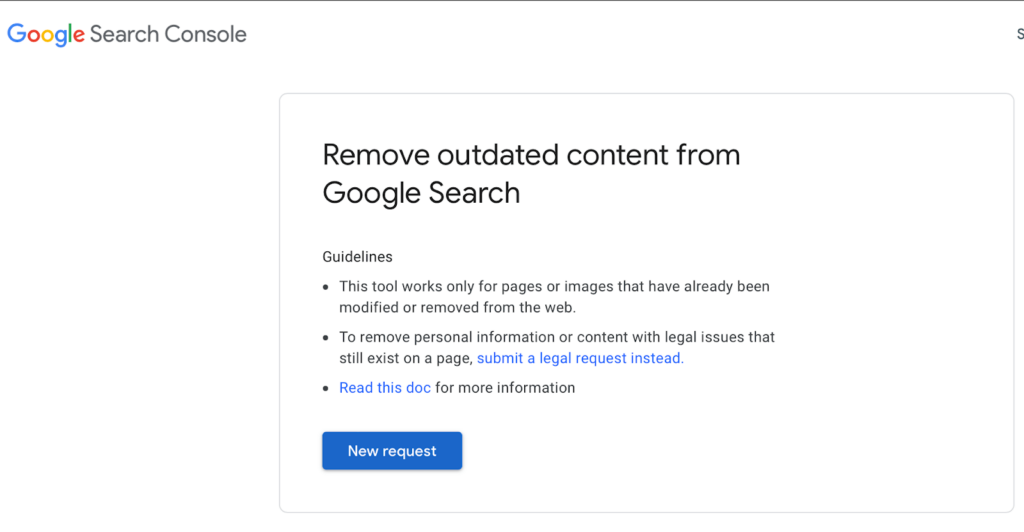
If your website has some pages containing your personal, sensitive or financial information, internal documents or proprietary information, you should consider removing all those URLs. If such information mistakenly goes into the hands of a hacker, you can face huge losses.
URLAny URL specifically created for the purpose of testing or staging should be removed from the site once it goes live. These pages unnecessarily make your site structure heavier and larger.
URL is IndexedBefore you decide which URLs to remove, you must know whether they are indexed. Many SEO professionals use the site: to find out if a page is indexed. This necessarily doesn’t guarantee the actual indexation of a page, as pages shown on the site: might be canonicalized or redirected. This can lead to displaying content from other pages.
A better way is to check the index coverage report in the Google Search Console. This report provides complete information on how Google treats particular pages. Another way is to search for a full URL on Google to check its status.
URLThere are many ways to remove URLs from Google search results. They include:
URLs via Google Search Console.URL using Google Search ConsoleFirst of all, log in to your Google Search Console. If you don’t have an account, make sure to sign in and link your website to the account.
URLURL you want to remove and select the type of removal (i.e., temporary or clearing the cache).To remove the URL permanently, follow these steps.
You can also delete the page and redirect it using a 404 (Not Found) or 410(Gone) error. Make sure you use Google Search Console to track that particular URL status.
robots.txt fileYou can also remove a URL by using robots.txt file. Follow these steps to remove the URL
URL.User-agent: Googlebot
Disallow: /path-to-page/
You need to keep in mind that pages blocked in robots.txt are not removed but just prevented from Google to crawl them.
If you don’t have access to a website but find a page promoting harmful or spammy content, you can use the Google Outdated Content Removal Tool.
URLs.”URL and click on “Request Removal.”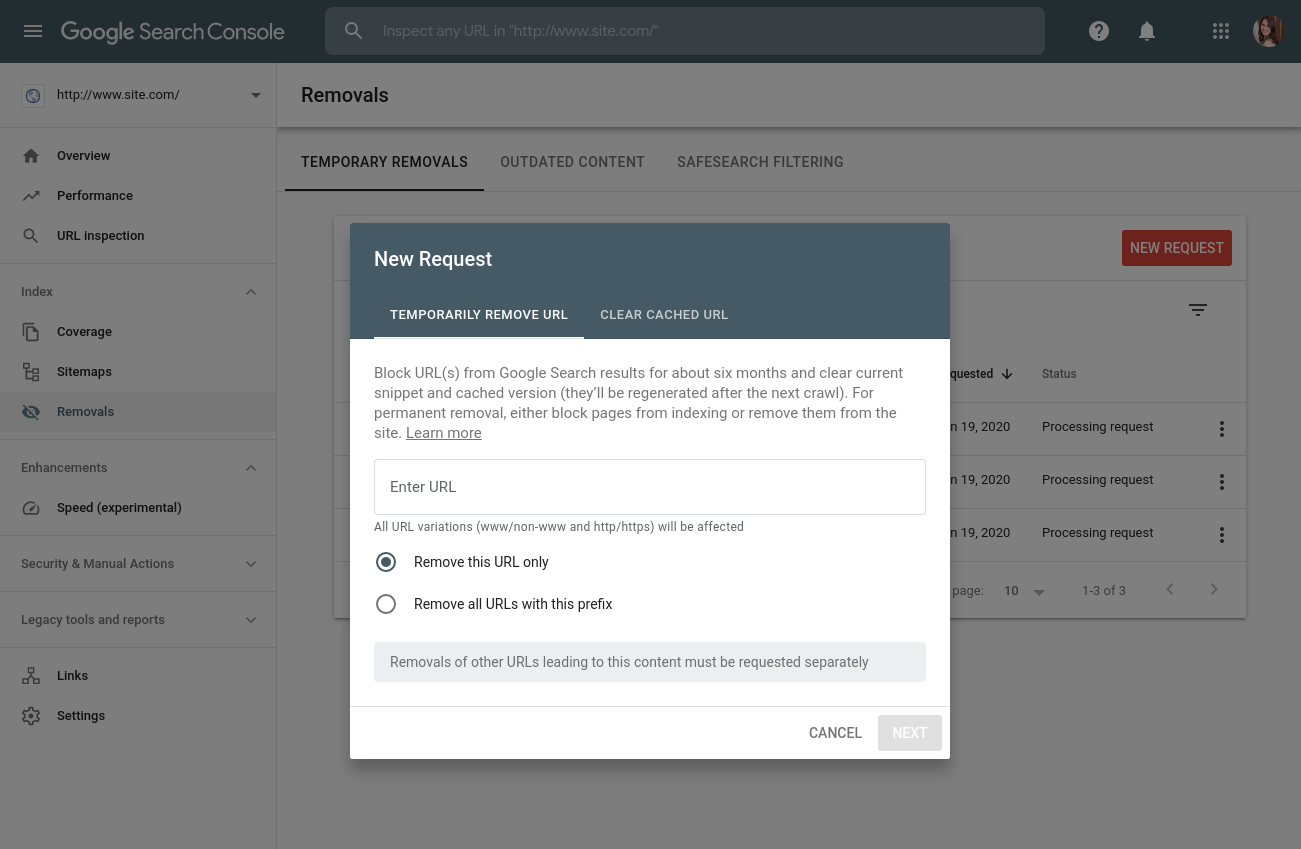
If you want to remove an image from Google search, follow similar steps. The only difference is that you need to provide the link to that particular image.
In addition to all of these options, you can restrict access to that particular page or image. You can add HTTP authentication or add that URL to IP Whitelisting.
URL RemovalsThere are always high-priority tasks and tasks that you can delay a little bit.
URLs that threaten your ranking or have confidential information need to be removed on a priority basis.URLs that target specific users or are built for particular purposes like staging, testing, portals or other intranet URLs.URLs that have duplicate content and are not damaging your site’s SEO.There are a few common mistakes made by SEO professionals while removing a URL. These include:
Even if you block a URL from Google to crawl, it is still possible to be showing in search results. A few possible reasons for this include:
URL suffers from a “pending removal” request. It takes approximately from a few hours to a few days to fulfill your request.URL from search results for 6 months temporarily, there is a high possibility that it may have reappeared as a search result.URL you submitted might not be the correct one. Before submitting, it is suggested that you double-check it.URL removal tool.SEO professionals used noindex in robots.txt extensively to remove URLs, but Google never formally supported it. They have finally removed this feature or stopped supporting this practice. If a website is making use of it, then its ranking will only be affected.
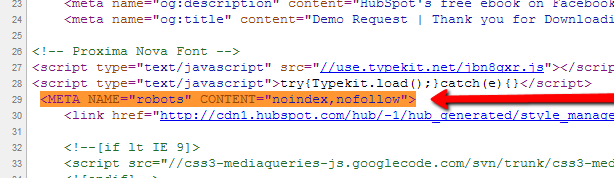
Nofollow and noindex commonly get confused. They use them interchangeably; however, that is not the case. Search engines will deliberately leave out the pages from indexing where noindex is being implemented, while in nofollow, they will index it but will not follow the links on that page.
URL when you are not the OwnerIf you are not the website owner and want to remove the URL from someone’s website, there are ways to resolve this. This could possibly happen for many reasons.
In any case, a few of the ways in which you can tackle this issue include: